

animation pro
Animation Pro brings desktop-class frame-by-frame animation to iPad. Specifically designed for intermediate to expert level animators, Animation Pro includes a long list of professional tools, such as automatic lip-synching, cloning (for automated shadows and reflections), motion-blur and camera depth-of-field to produce stunning studio quality animations.
Animation Pro has been designed, from the ground up, for cut-out-style animation (i.e. creating posable figures and animating them from frame to frame). Version 2.0 of Animation Pro, however, introduced the ability to draw upon figure body parts whilst animating making it possible to use Animation Pro for more traditional (hand-drawn) animation. For more information regarding traditional animation in Animation Pro, please view the following video tutorial:
http://www.hotjamdonut.com.au/AnimationPro/PlayTutorial.html?tutorial=q5_lZc7Klbs
ANIMATING
— Produce professional cut-out-style, stick-figure, traditional (hand-drawn) or stop-motion animations
— Add background images from your photo library or shoot them from within Animation Pro
— Add videos as background images and use the new drawing tools for rotoscoping
— Add figures, images, text, audio and clones to your animations
— Manage all of your assets using the integrated File Manager
— Use a Shadow Wizard to quickly add shadows to your figures
— See instant previews
— Use onion-skins to see the difference between the previous and/or next frames
— Copy and paste backgrounds, figures, frames and camera settings
— Key figure, item and camera properties across multiple frames
— Access web tutorials and nearly 500 pages of in-depth help (included)
FIGURES
Animation Pro provides all of the tools that you’ll need to create complex posable figures from one or more items.
— Select from a large library of pre-installed figures*
— Create your own figures using the integrated Figure Editor
— Move, scale, flip and rotate figures
— Colour, tint and set the opacity of figures
— Blur, distort, shear, accent and highlight figures
— Add glows, outlines and motion-blur
— Substitute figures as you animate
ITEMS
— Scale, flip and rotate the items within figures
— Colour, tint and set the opacity of items
— Bend items
— Substitute items as you animate
— Draw on image items whilst you animate
CLONES
In Animation Pro, figures can be cloned to produce shadows, reflections or even an entire army of figures that animate automatically as the parent figure is changed.
— Control which aspects of a parent figure are cloned
— Use a Shadow Wizard to create realistic looking shadows
AUDIO
— Select from a large library of included sound effects
— See audio as a wave-form on the film-strip
— Record your own audio
— Add audio to frames or figures
— Automatically pan audio as figures move
— Automatically animate/lip-synch the mouths on figures
— Create your own mouths using the integrated Mouth Creator
VIRTUAL CAMERA
— Pan, zoom and rotate a virtual camera
— Simulate camera depth of field
TWEENING
Animation Pro can automatically generate intermediate frames (tweens), between those that you create, to produce super smooth animations.
— Take full control over which features are tweened from frame to frame
— Override tweens with user-tweens where necessary
EXPORTING
— Export video (mov, m4v, mp4) with frame rates up to 60fps and resolutions up to 1920×1080#
— Export image sequences (with or without transparency)
— Export 3D (anaglyph or side-by-side) video or images
SHARING
Animation Pro allows the following items (that you create) to be exported or shared:
— videos
— projects
— figures
— images (and/or image projects)
— lip-synching mouths (and/or mouth projects)
— sounds
* Animation Pro can also import StickMotion Animation figures.
# Animation Pro can produce videos and images in resolutions up to 1920×1080 from Retina devices.
For more information and tutorials, please visit http://www.hotjamdonut.com.au
flipaclip: студия анимации
Оживите мультипликацию с помощью нового улучшенного FlipaClip, идеально подходящего и новичкам, и профи! Посетите нашу новую домашнюю страницу и вдохновитесь!
Оживляйте свои мечты и воплощайте их в жизнь! Мощные и занимательные инструменты анимации FlipaClip упрощают покадровую анимацию.
Создавайте потрясающие анимации с помощью обновленного FlipaClip! Следите за своими проектами с помощью новой красивой домашней страницы и удобных стеков, переключайтесь между светлым и темным режимами и открывайте новые возможности от создателей видео FlipaClip.
Присоединяйтесь к нашему растущему сообществу аниматоров и художников, создающих уникальные и захватывающие анимации каждый день! Делитесь своими творениями со всем миром на YouTube, Инстаграм, ТикТок и других популярных платформах и просматривайте и вдохновляйтесь мультипликацией FlipaClip!
Изучите покадровую анимацию, нарисуйте картинки и превратите их в анимированные гифки, или же рисуйте поверх видео, чтобы создать видео с фотоперекладкой. Быстро выбирайте контент с помощью лассо и легко настраивайте цвета с помощью нового инструмента заливки.
Испытайте свои навыки анимации и участвуйте в наших конкурсах! Вы можете выиграть захватывающие призы, просто развлекаясь!
Загружайте FlipaClip прямо сегодня и начинайте анимировать!
ОСОБЕННОСТИ FLIPACLIP
ИНСТРУМЕНТЫ ДЛЯ РИСОВАНИЯ
• Рисуйте с помощью практичных инструментов — Кисть, Лассо, Заливка, Ластик, Линейка, а также вставляйте текст с несколькими вариантами шрифта бесплатно!
• Поддерживается Карандаш Apple.
АНИМАЦИОННЫЕ СЛОИ
• Используйте до 3 слоев бесплатно!
• Станьте профи и добавляйте до 10 слоев!
• Мы прислушались к вам и добавили больше слоев. Учтите, что приложение может испытывать проблемы с производительностью после добавления более 6 слоев.
АНИМАЦИОННЫЕ ИНСТРУМЕНТЫ
• Легко выполняйте покадровую анимацию с интуитивной анимационной монтажной линейкой и практическими инструментами
• Анимационный инструмент «луковая шелуха»
• Просмотрщик кадров
• Оверлейная сетка, направляющая анимацию
• Анимационные контроли вперед/назад
• И другие инструменты!
ДОБАВЛЯЙТЕ АУДИО
• С легкостью добавляйте аудиоклипы до восьми аудиотреков бесплатно.
• Добавляйте диалоги в свою анимацию с записью голоса!
• Наслаждайтесь креативом со нашим курируемыми звуковыми fx-аудиопакетами.
ВСТАВЛЯЙТЕ ИЗОБРАЖЕНИЯ И ВИДЕО
• Анимируйте изображения, которые вы импортировали или нарисовали поверх своих видео.
• Добавляйте фотоперекладку на свои видео.
• Перетаскивайте изображения на свои холсты. (только на iPadOS 11 и выше)
СОЗДАВАЙТЕ АНИМАЦИЮ
• Создавайте анимированные клипы в формате MP4 или GIF-файлы.
• Поддерживаются прозрачные последовательности PNG.
• Публикуйте свои анимированные видео в YouTube.
ДЕЛИТЕСЬ КЛИПАМИ
• Делитесь своей анимацией в разных источниках!
• Делайте публикации в ТикТок, YouTube, Инстаграм, Фейсбук и Тумблр.
• Открывайте для себя видео создателей контента FlipaClip и вдохновляйтесь!
СОРЕВНОВАНИЯ!
• Участвуйте в разнообразных бесплатных соревнованиях, которые мы публикуем.
• Развлекайтесь и выигрывайте увлекательные призы!
——————————————
ВДОХНОВЛЯЙТЕСЬ
Посмотрите, что создают пользователи FlipaClip! Ищите по хэштэгу #FlipaClip в Инстаграме или просматривайте этих создателей контента, избранных у нас на скриншотах в AppleStore:
@harshit0325
@t_.man
@fr0stz_
@all_dat_mani
@lambtarl
And more!
Подписывайтесь на нас в Инстаграме:
https://www.instagram.com/flipaclip/
Подписывайтесь на наш канал на YouTube:
https://www.youtube.com/flipaclip
——————————————
ПОДДЕРЖКА
Проблемы с приложением, или хотите поделиться идеями?
Используйте http://support.flipaclip.us/
————————————————————————————
Теперь доступны виджеты FlipaClip!
Последняя версия содержит новые функции, в ней исправлены ошибки и улучшена производительность. А именно:
— Новая прямая публикация в ТикТок!
— Поддержка новых виджетов. Получайте быстрый доступ к своим последним анимациям или создавайте новые проекты. Два доступных варианта виджета, в том числе режим внешнего вида.
roughanimator — animation app
I was trained in animation on paper, and RoughAnimator was very intuitive and easy for me to pick up. It honestly feels just like animating on paper, but more convenient. This isn’t a motion graphics or rig animation program, but its the best app I’ve found for doing purely hand-drawn animation. The brush engine, while simple, even feels more responsive and natural than in other iPad drawing apps I’ve used.
I just have ONE gripe! The play/preview button is right above the frame forward/back buttons, so when I’m drawing with one hand while flipping the drawings with the other, I accidentally press the play button ALL the time. PLEASE consider giving users the ability to customize the button layout, or at least choose between more than one prefab layout. I don’t think the play button needs to be right under your thumb, it’s not the kind of thing you need to be able to hit frequently without looking, like the frame flip buttons are.
Otherwise, fantastic job on this essential animation app!
Использование memoji в сообщениях на ipad
Придумайте, как будет выглядеть Ваш собственный персонаж Memoji, — выберите цвет кожи, черты лица, прическу и цвет волос, добавьте головной убор, очки и другие особенности. Можно создать разных персонажей Memoji под разное настроение.
В разговоре коснитесь кнопки
 , затем коснитесь кнопки
  , затем коснитесь кнопки .
Касайтесь каждой черты лица или особенности внешности и выбирайте ниже подходящие варианты. Когда Вы добавляете новые особенности к Memoji, отображается анимация персонажа.
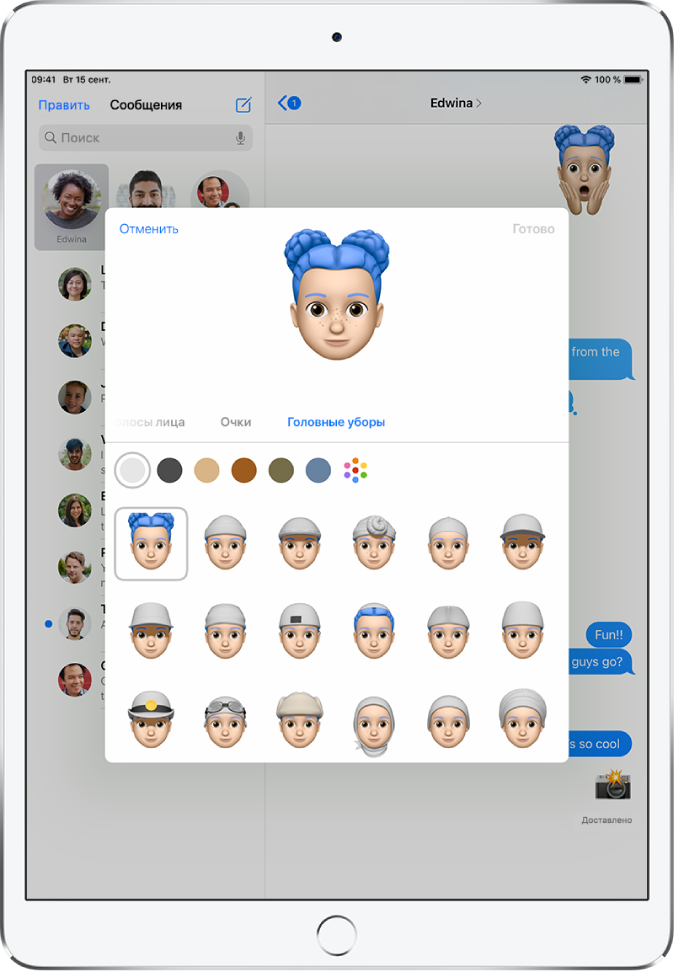
Коснитесь «Готово», чтобы добавить персонажа Memoji в Вашу коллекцию.
Чтобы отредактировать, дублировать или удалить стикер Memoji, коснитесь кнопки
, коснитесь Memoji, затем коснитесь кнопки  , коснитесь Memoji, затем коснитесь кнопки .


